Wednesday, November 6, 2013

10 SQL Azure Gotchas

Another list! Honestly, I am perfectly capable of stringing words together into a semi-coherent self-contained piece with a beginning, middle and end, but this, I'm afraid is going to be another list. This one focusses on some of the differences you'll face if you're used to working with a traditional local SQL Server server or database and you're faced with working in the cloud for the first time. Don't be afraid, though: once you get used to it, SQL Azure (or Windows Azure SQL Database as we're somewhat tiresomely supposed to refer to it these days) rocks. 

Without further ado, the list:

- Can't connect? Make sure your current external IP address is in the permitted list.

- It's perfectly possible to have a view or a stored procedure in a traditional SQL database that
refers to a non-existent SQL table or column. You can't run this view or SP successfully, but it'll sit there quite happily and be included in backups, restores, etc. However, the Azure Management Portal will report errors if you attempt to back up a database (export to BACPAC file)  that includes such a view.


- Much the same happens when you try to upload a local database DACPAC to Azure. Views with external references (objects in other databases or on  linked servers) aren't allowed and will need to be dropped before uploading.

- DACPAC upload doesn't like extended properties, either. 


- Make sure the connection string or connection options for your application specify encrypted connections. Azure doesn't allow unencrypted connections. 


- No database context switching is allowed in a script, so use of USE isn't permitted. 


- The upload doesn't like a SQL Server 2012 database as source, either. (Note: I haven't tried this very recently, and I can't imagine in any case that it's a situation that'll continue very much longer even if it's still the case). 


- Don't try uploading a DACPAC containing logins that don't (or can't - like Windows authentication AD
logins) exist on the Azure server. You'll be sorr-eeeee. 


- Working with ADODB recordsets can be tricky; if Azure doesn't maintain the connection, your recordset object is suddenly null. There's a good article here on handling dropped connections in your application. My experience, however, is that connections are very stable in general, and when your application is dropping the connection there's usually a problem in the underlying data source or query. This is a topic I may revisit later, because it's a whole series of gotchas all on it's own.


- Tables with varchar/nvarchar(max) fields can't be reindexed online with the REBUILD WITH ONLINE option...but a simple index REORGANIZE isn't supported in Azure. Think about whether you really need those (MAX) length fields, or if you can use restricted-length fields instead.


Labels: ,

Thursday, May 30, 2013

Azure Wish List

Microsoft really hit the bullseye with Windows Azure SQL Database, delivering an amazingly mature and feature-rich product practically from day one. It's not perfect, though; a number of functions and features that we've been using for years on local SQL Server installs are still missing, as well as a few items that would make Azure easier to use and a more attractive choice for new development work. Here's my wish list:
  1. Make it possible to use the Profiler

    The SQL Server Profiler is one of the most important tools in the database administrator/developer's toolbox, giving detailed, fine-grained realtime insight into database activity. It's unmissable for both performance analysis and tuning and debugging. Use of the tool on Azure databases isn't supported at the moment, and it's a big gap. There's good and useful information available from the online management application, but this needs to be real-time, filterable, sortable and configurable to match the power of SQL Profiler.

  2. Add Pricing analysis tools/reports

    Microsoft offer a number of different pricing plans for their cloud database service, but what they all boil down to is a fixed price per database per month, plus charges based on the amount of outgoing data traffic. What I miss, though, is a simple way to see which queries or database activity in a given database are generating the most billable traffic. In other words, which queries and commands are the most costly in terms of euros and cents rather than in the traditional SQL usage of "costly" meaning resource-intensive. It's relatively easy to find slow-performing queries and memory-intensive commands, for instance, but now we need ways to match recorded database activity to the charges we see appearing on the monthly invoices.

  3. Add the possibility to schedule database operations

    The ability to schedule tasks is unmissable. We don't necessarily need the sophistication of the Jobs functionality offered in traditional offline SQL Server installations, but the basic ability to schedule SQL commands at fixed times or outside production hours is sorely missed. Even the possibility to run command-line tasks like you can with the Windows Scheduler would already be a big improvement.


    These three items seem like "must-haves" to me. In the "nice-to-have" corner, the following:

  4. Make it easier to upload and convert a database.

    Converting an existing traditional offline SQL Server database for use on an Azure cloud database server is by no means impossible, but it's not as easy as it should be. Firstly, the "Extract Data-tier Application" wizard (that name alone!) stops at the first problem or Azure-incompatible usage it encounters rather than analyzing the source database for any and all potential issues at once. This means that arriving at a clean uploadable DACPAC (deployable database package) can involve starting and restarting the wizard many times, while fixing reported issues in between. Worse, the resulting package only contains database objects, no data, meaning that this needs to be scripted or uploaded separately. It's all do-able and these are not insuperable problems, but it should be possible to streamline the process.

  5. Make it possible to edit directly in SSMS

    With an offline traditional SQL Server installation, the SQL Server Management Studio tool we all know and love makes it easy to edit data directly in a table for those quick manual edits. Right-click on a table in the Object Explorer, "Edit Top 200 Rows", and Bob's your uncle. You can't do this with a table in an Azure database though. Stranger still, you can edit records directly in an Azure-hosted table using SQL Server Data Tools, so there doesn't appear to be any really good reason for preventing this in Management Studio. This is by no means an important drawback, but it is one that I encounter (and curse) frequently.

  6. Make it easier to switch database context

    Another minor but daily irritation is the necessity to disconnect a query and reconnect it when you want to switch between databases on the same cloud server, rather than simply selecting a different database from the Management Studio "Available Databases" drop-down. Again, there doesn't seem to be a good reason for this limitation: if you start a new query window in the master database, you can choose any available user database from the list, but once you've chosen, the only way to switch to another database is to disconnect your query.

  7. And finally...

    A snappier name than "Windows Azure SQL Database". What, exactly was wrong with "SQL Azure"?

Labels: , ,

Tuesday, January 29, 2013

Azure databases

I've been working intensively with Windows Azure SQL for the past six months, and it's been tremendously interesting - exciting, even - to be in near the beginning of a technology that's maturing at such an astonishing speed. It feels similar to the sort of gold rush excitement that surrounded the web around 1994, when the possibilities of the web were only being hinted at. Who could have predicted then that we'd already live in a world of mobile internet, streaming video, and omnipresent social media?

Similiarly, it's difficult to predict all the uses to which Microsoft's cloud architecture solutions will be put in the next few years, but the impact is likely to be seismic. I smile when I see reports predicting Microsoft's demise just because Windows Phone hasn't taken off, or Windows 8, when it's obvious to me that what they're doing in the background with cloud engineering is where the real action is. It's difficult to overstate how impressive the various Azure services are, how well implemented, and the sheer value for money offered.

Just from the point of SQL databases, I'd be inclined to say that I will never willingly implement a physical SQL server again, or recommend the same to any client. The sheer ease, speed and cost-effectiveness of creating a new cloud database server just crush the limited benefits of a physical machine. The ability to fine-tune database files and queries to match the hardware of a physical database server remains, of course, but even this is a dying art these past few years since virtualization and SANs became commonplace. Who gets to install SQL Server on bare metal any more?

The learning curve is shallow. Most existing tools just work, and most existing applications that communicate with a traditional on-premises SQL Server database will do the same with an Azure SQL database without difficulty. The biggest change for me as a developer was reusing skills I'd learned long ago, when LAN bandwidth was limited and expensive; keeping data traffic lean and to-the-point, and pushing as much work as possible back to the (cloud) server rather than processing large data sets on the client workstation in code.

There are obviously a few things still missing. Top of my wishlist is the SQL Profiler, for instance, even though the online toolset is surprisingly thorough in the amount of data and metadata offered. I'd also like to see some sort of analysis tool that checks your existing offline database for potential issues and offers to fix them, or script the fixes. As is, deploying an existing database to Azure is a question of trial-and-error where the wizard fails a number of times, failing on each encountered problem until all issues are resolved.

Even with these caveats, though, it's an astonishingly mature platform. Last week, someone asked me if I had a USB stick and I had to think for a moment, because between SkyDrive and Google Drive I haven't copied files to physical media in an age. It's these changes, the ones you barely notice while they're happening, that are fundamental. Windows Azure services feels like one of these shifts to me, but on a far grander scale, and I'm really happy to be involved. I know what I'm going to be doing for the rest of my working career.

Labels: , , ,

Friday, February 24, 2012

Head in the Cloud

Like everyone else in this field, I've been following Microsoft's moves into the cloud with interest these past couple of years. I took out a free intro subscription to SQL Azure in 2010 to see what it was and what the possibilities were, created a test database, noted the restrictions and, to be honest, fairly well left it at that. Being up to speed with the newest developments is part of the job description, but SQL Azure didn't feel, at the time, like something my customers were going to be asking for.

Just this week, though, I found myself struggling with the implementation of a fairly simple web app for a customer. The app had been working happily on my test web server and on an old SQL2005-based database server, but we ran into problems moving the database to my customer's database server. This was a fairly typical SQL database setup provided as part of a standard hosting package. The problem was, the provider's security policies restricted the ability of standard tools (like the SQL Management Studio) to connect to their db servers, but the online tools they provided themselves were buggy and inadequate.

I'll spare you all the gory details, but we couldn't restore local backups, couldn't run INSERT scripts, and finally, after dropping the entire database in frustration to start again, couldn't recreate the database. Hair-pulling time.

And then I remembered Azure. I'd already registered, of course, so it was the work of a moment to log in. Within minutes, I had a new dedicated server and database up and running. I tried running the CREATE objects and INSERT data script that I'd already prepared, but I got some (entirely understandable) errors relating to filegroups. I ran a fresh "Script Objects and Data" task from my local Management Studio, and this ran without problems on the SQL Azure database.  Of course, if I'd had the time to look around a little further, I'd have seen that I could simply have exported my local database en masse as a data-tier application, but that was something I discovered a little later once the dust had settled.

Having run some data-integrity checks on the cloud database I moved on to connecting my ASP.NET application to it. Which turned out to be comically easy; it was simply a change to the server name in the connection string. I was able to call my customer within a little more than an hour and say, "look at this". The decision was quickly made; this was the way to go.

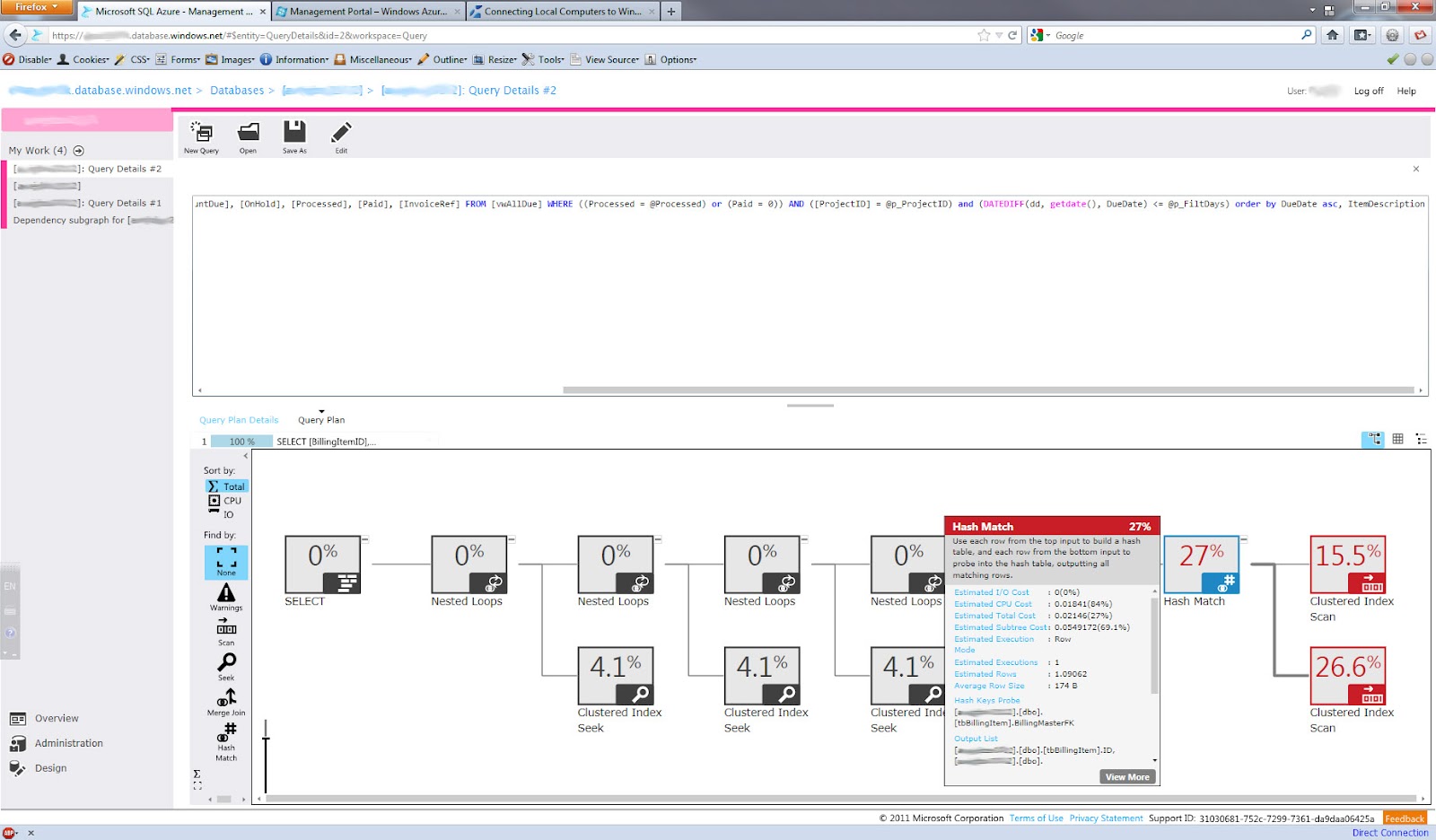
Once the dust settled, I had the time to take a good luck around the management interface. It's really impressive these days, unrecognisable from just a year ago. In first instance, and not unimportantly, it integrates seamlessly with your desktop Management Studio. An Azure server is just another server you can connect to. The online tools are impressive in their own right, though, with features that I just hadn't expected at this stage of development, like graphical query execution plans.


I also discovered a missing foreign key relationship (my fault), which I was able to correct using the online GUI; no scripting of painful temporary tables to preserve existing data, no data loss, and done within the blink of an eye.


There's a lot more too, of course, but to me the most important aspect was seeing how SQL Azure behaved in a production situation. When you're dealing with  real data and real data structures, that's when a platform shows what it can and can't do, and Azure passed with flying colours. I'm really looking forward to the next chance I get to use it in a production setting. 

Labels: ,

Monday, January 3, 2011

Crystal Ball

Firstly, a happy new year to everyone. I'm really looking forward to getting to grips with this year's work and challenges, and I hope that you can say something similar.

There's a major new release of SQL Server in the pipeline, for starters. The preview release has been available for some months now, and it already seems like being the most significant product version since the landmark 2005 release. (It's no accident that SQL Server 2005 is still by far the most popular rendition of the Microsoft DBMS that I come across at customer sites to this day). SSIS functionality gets a long-overdue update in 2011 that introduces important new capabilities to the suite, as well as major updates to the DB engine querying capabilities, spatial data, high availability among other features.

Something to look forward to, then. 2010 was a quiet year on the MS database front. There's certainly been a large push on from Microsoft in the direction of the cloud, with SQL Azure making huge strides in a short time as regards functionality and ease-of-use. While cloud database services have the possibility to completely change the way we develop and interact with database architecture, it remains to be seen whether businesses (in the short-to-medium term) will want to surrender their data to an external entity. Regardless of your point of view on the morality or legality of the WikiLeaks affair, Amazon's actions in closing infrastructure access to the organisation highlights one of the inherent weaknesses of cloud computing; your business is dependent not only on the professionalism and technical foundations of external parties, but also on the goodwill of external governments and other agencies. Would you host your online bookstore database on Amazon Web Services? Your online presentation app with Microsoft Azure? Your mapping technology with Google? The technical barriers to cloud application and data delivery have practically disappeared already, but questions regarding ownership, permissions, entitlements and responsibilities arise that were never an issue in a world of applications and data hosted on private data centres.

It promises to be an interesting year.

Labels: , , , , , ,