
Forgotten, but not gone
My first contact with Microsoft SQL Server was with version 7.0 back in the late nineties. Back then, there wasn't a whole lot more to the product than the database engine and the tools to manage it. That was plenty to be going on with, mind you: even then, there was a huge amount of information to be absorbed if you wanted to claim understanding of how to build, implement & manage databases built on SQL Server.
5 versions later, though, the amount of functionality bundled with even the Standard Edition is staggering, encompassing not just the relational database engine but reporting, BI, and advanced data management. Few can now claim with any authority to be a 'SQL Server expert'; each area within SQL Server is a lifetime's work on its own at this stage, even if new product versions with new functions and capabilities weren't arriving every few years. 'Expertise' is in many instances having enough background & experience with the product that you know in general terms what capabilities are there & where to find them, and being quickly able to get up to speed on the details of the less everyday areas of the suite and implement them successfully as the need arises.
All of which is a very long-winded way of saying that, once you've been working with SQL Server for more than a few years, you've likely forgotten more than you know about the parts of the product you're not using daily (or you've got a much better memory than I have).
A reminder came this week. I was working with a client who wanted to configure his server in such a way that another contractor could create, modify, test and schedule SQL jobs relating to the contractor's own project, but not modify other jobs (like general backup & maintenance jobs, for instance). Sysadmin permissions, then, were too broad, but any of the other fixed server roles were too restricted.
We took a look in MSDB, though, and came up with the SQLAgentOperatorRole role. This was added in SQL Server 2005, but I'd never had cause to use it in the meantime and subsequently forgotten about it.
 For this purpose, though, it's almost ideal. We added the contractor's user account and a test account as members of the group, then logged in again with the test account to see what we could & couldn't do. As the test user, we could add new jobs, add job steps, modify both at will and schedule them as necessary. We weren't able to pick existing job schedules, interestingly, but were forced to create our own set (I can see the point of this, but it goes a bit far for most situations).
Better still, we couldn't modify other jobs (jobs with other owners) with one important caveat: we were able to disable and enable jobs and job schedules from other owners. It's not at all clear to me in which situations it would be desirable to block someone from, say, editing a job description while allowing them to disable the entire job, but that appears to be the situation.
We decided to use the role nonetheless, deciding that 95% was better than nothing. I dug a bit further afterwards, though, and discovered that the role SQLAgentUserRole fit our needs better. As a member of this role, you can still create, modify, run and schedule your own jobs, but neither modify or disable jobs from other owners.
Re-learning stuff like this, and getting to use it in production scenarios, is what keeps this line of work continually interesting.
5 versions later, though, the amount of functionality bundled with even the Standard Edition is staggering, encompassing not just the relational database engine but reporting, BI, and advanced data management. Few can now claim with any authority to be a 'SQL Server expert'; each area within SQL Server is a lifetime's work on its own at this stage, even if new product versions with new functions and capabilities weren't arriving every few years. 'Expertise' is in many instances having enough background & experience with the product that you know in general terms what capabilities are there & where to find them, and being quickly able to get up to speed on the details of the less everyday areas of the suite and implement them successfully as the need arises.
All of which is a very long-winded way of saying that, once you've been working with SQL Server for more than a few years, you've likely forgotten more than you know about the parts of the product you're not using daily (or you've got a much better memory than I have).
A reminder came this week. I was working with a client who wanted to configure his server in such a way that another contractor could create, modify, test and schedule SQL jobs relating to the contractor's own project, but not modify other jobs (like general backup & maintenance jobs, for instance). Sysadmin permissions, then, were too broad, but any of the other fixed server roles were too restricted.
We took a look in MSDB, though, and came up with the SQLAgentOperatorRole role. This was added in SQL Server 2005, but I'd never had cause to use it in the meantime and subsequently forgotten about it.
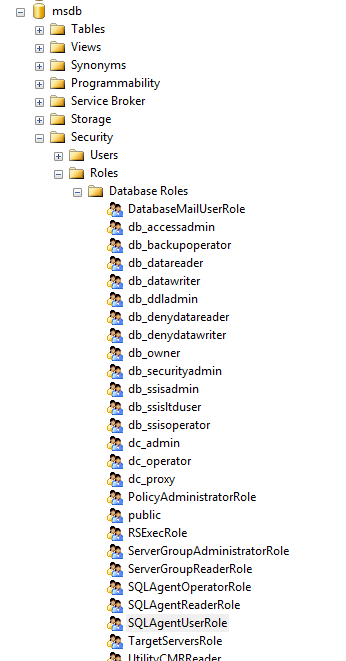
Better still, we couldn't modify other jobs (jobs with other owners) with one important caveat: we were able to disable and enable jobs and job schedules from other owners. It's not at all clear to me in which situations it would be desirable to block someone from, say, editing a job description while allowing them to disable the entire job, but that appears to be the situation.
We decided to use the role nonetheless, deciding that 95% was better than nothing. I dug a bit further afterwards, though, and discovered that the role SQLAgentUserRole fit our needs better. As a member of this role, you can still create, modify, run and schedule your own jobs, but neither modify or disable jobs from other owners.
Re-learning stuff like this, and getting to use it in production scenarios, is what keeps this line of work continually interesting.
Labels: Database Engine, SQL 2008, SQL 2008 R2
posted by Paul
at
09:11


