Saturday, August 18, 2012

Forgotten, but not gone

My first contact with Microsoft SQL Server was with version 7.0 back in the late nineties. Back then, there wasn't a whole lot more to the product than the database engine and the tools to manage it. That was plenty to be going on with, mind you: even then, there was a huge amount of information to be absorbed if you wanted to claim understanding of how to build, implement & manage databases built on SQL Server.

5 versions later, though, the amount of functionality bundled with even the Standard Edition is staggering, encompassing not just the relational database engine but reporting, BI, and advanced data management. Few can now claim with any authority to be a 'SQL Server expert'; each area within SQL Server is a lifetime's work on its own at this stage, even if new product versions with new functions and capabilities weren't arriving every few years. 'Expertise' is in many instances having enough background & experience with the product that you know in general terms what capabilities are there & where to find them, and being quickly able to get up to speed on the details of the less everyday areas of the suite and implement them successfully as the need arises.

All of which is a very long-winded way of saying that, once you've been working with SQL Server for more than a few years, you've likely forgotten more than you know about the parts of the product you're not using daily (or you've got a much better memory than I have).

A reminder came this week. I was working with a client who wanted to configure his server in such a way that another contractor could create, modify, test and schedule SQL jobs relating to the contractor's own project, but not modify other jobs (like general backup & maintenance jobs, for instance). Sysadmin permissions, then, were too broad, but any of the other fixed server roles were too restricted.

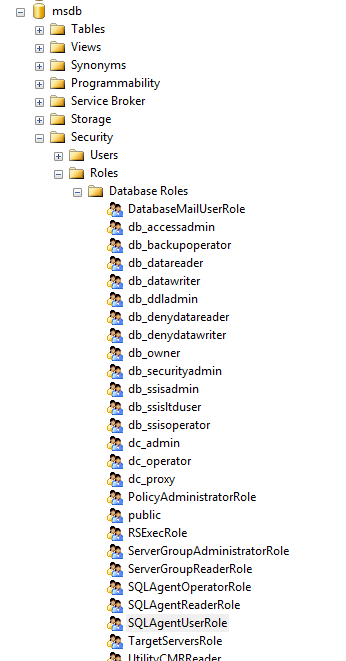
We took a look in MSDB, though, and came up with the SQLAgentOperatorRole role. This was added in SQL Server 2005, but I'd never had cause to use it in the meantime and subsequently forgotten about it.
For this purpose, though, it's almost ideal. We added the contractor's user account and a test account as members of the group, then logged in again with the test account to see what we could & couldn't do. As the test user, we could add new jobs, add job steps, modify both at will and schedule them as necessary. We weren't able to pick existing job schedules, interestingly, but were forced to create our own set (I can see the point of this, but it goes a bit far for most situations).

Better still, we couldn't modify other jobs (jobs with other owners) with one important caveat: we were able to disable and enable jobs and job schedules from other owners. It's not at all clear to me in which situations it would be desirable to block someone from, say, editing a job description while allowing them to disable the entire job, but that appears to be the situation.

We decided to use the role nonetheless, deciding that 95% was better than nothing. I dug a bit further afterwards, though, and discovered that the role SQLAgentUserRole fit our needs better. As a member of this role, you can still create, modify, run and schedule your own jobs, but neither modify or disable jobs from other owners.

Re-learning stuff like this, and getting to use it in production scenarios, is what keeps this line of work continually interesting.

Labels: , ,

Friday, May 25, 2012

Being Resourceful

A client of mine has a system in development that consists of a normal, multi-user .NET desktop application plus a number of services that manage some occasional heavy-duty background processing on the database server. The problem is, when the services are running, the application performance grinds to a standstill and users are left for minutes on end waiting for their application to react.

This obviously isn't acceptable, but lowering the impact of the background processes isn't straightforward, either. It's not as simple as just rewriting a runaway query or adding a few indexes, and re-architecting the entire solution far into development just isn't going to happen. The question was, would it be possible to limit the amount of resources these background processes consume? My customer decided to try the Resource Governor feature in SQL Server but had no useful or tangible performance improvement, so I was asked to take a look at their setup and see what, if anything, was going wrong.

My own experience with the Resource Governor was limited to what I'd read about it, as well as trying out some example test setups, but I'd never configured or observed it on a semi-live environment, so I was delighted to get the opportunity to learn more about it.

We spent almost two days in total configuring and testing, making tiny changes in the RG configuration and observing the change in behaviour and processing time for similar workloads. With the RG disabled, the background processes would take a full 100% of the server processor time for minutes on end, so the goal was to brake this enough to leave enough processor capacity for the desktop app users without overly limiting the background processing.

Our results were surprising - to me, at least. The first surprise was how far down we had to take all the settings before we saw any effect at all. The second surprise (and I'd imagine that it's not always the case),  was that we consistently observed a sort of threshold effect while changing settings; nothing would change in observed or measured load through a range of changes until suddenly, with one change up or down, there'd be a huge increase or decrease in consumed resources. After a lot of experimentation and measurement, we eventually arrived at a configuration that gave us a decent mix of resource use and allocation.


So, is the Resource Governor a worthwhile addition to the DBA's toolbox? Absolutely. You're obviously still better off trying to tackle the source of excessive resource consumption rather than artificially limiting it, but when this isn't possible the Resource Governor gives you one more option to work with before going to the boss, cap in hand, and asking for a more powerful server. It's tricky enough to configure properly and not massively well documented yet but you can definitely get results with it.

Labels: , ,

Saturday, December 4, 2010

SQL Error Handling

Some time ago I wrote an introductory article for this site on SQL Error handling and the differences between SQL 2000 and SQL 2005 in that regard. (Download here as PDF). I had intended to expand upon this as a follow-up, but, as is so often the case, never got around to it.

Alex Kuznetsov has written a fantastic new book, "Defensive Database Programming with SQL Server", and one of the chapters from it deals with this subject in so much detail that I wouldn't dream of trying to top it. I'm not sure I'd completely agree with his contention that it may be better to implement your error trapping on the client in code, but his arguments are lucid and his examples compelling. Better yet, an article taken from the book on this subject can be found here. It's well worth your time.

Labels: , , , ,

Sunday, February 14, 2010

Things To Come

This week I attended a Microsoft TechNet session on the new and improved BI features that will arrive this summer in SQL Server 2008 R2 and Office 2010. The presentation was interesting and informative, but the products being presented were something of a mixed bag.

We first got a good look at PowerPivot, the Excel pivot table-local Analysis Services hybrid formerly known as Project Gemini. The performance, functionality and ease-of-use were certainly impressive given multi-million record datasets, but there seems to be no good reason to confine the functionality to Excel 2010. It's an add-in, and Excel 2007 supports large datasets, so there would seem to be no insurmountable technical reason to confine it to the new version. The MS take on the issue is apparently, "give Excel 2010 to a few power users, and the other users can access the workbooks thus created from SharePoint/Excel Services". Which may work fine for organisations that have implemented SharePoint, but leaves a lot of other companies in the cold. I'm not at all convinced that many firms are interested in upgrading to Office 2010 any time soon, and this smells like a marketing-driven decision to force upgrades in the absence of other compelling new features.

We saw the newest version of Report Builder in action, and to be honest it was a let-down. I was discussing it with another attendee afterwards, and we both felt that Report Builder is neither fish nor flesh. It's not full-featured enough to compete with professional reporting applications, and not simple enough to provide to users for basic or personal reporting needs. It's certainly better than the reporting tools included with the SQL 2005 BI Studio, but that's hardly the most ringing endorsement.

The biggest disappointment, though, was the first look at the long-awaited Master Data Management solution. This turns out to be little more than a data modelling tool with a very poor interface and a data store on the back-end. Populating the data store was out-of-scope (the sensible suggestion was that SSIS be used, but I'd expected at the very least some rudimentary wizards for building the pipes) and there was no mechanism whatsoever for enforcing the business rules defined for and in the central data model in the host applications and data stores. The idea is good and a market exists, but the execution, in this iteration at least, seems to leave a lot to be desired.

The last new product we got a look at was StreamInsight, an event response platform that will ship with SQL Server 2008 R2. The idea is, instead of checking for the existence of data meeting particular criteria in large volumes of fast-changing data, you define sets of criteria and filter your data through them. It sounds at first like the answer to many prayers, until one considers that SQL Notification Services did exactly the same thing in SQL Server 2005, only to be unceremoniously dropped with little explanation or apology less than three years later in SQL Server 2008. It's very difficult to expect customers and partners to invest time or money in technologies if they can't be confident that support and upgrade paths will exist in the future. Most businesses simply don't work with the three-year version cycles of Microsoft, so StreamInsight will be very much a wait-and-see proposition. Which is something of a pity.

It brings me no pleasure to complain about Microsoft; I've earned a living for many years on the back of their efforts and am always interested in seeing what they come out with next. The new crop of BI technologies don't seem to cut the mustard, though, in many essential aspects.

Labels: , , , ,

Tuesday, September 1, 2009

Sparklines in Excel

You could be forgiven for thinking that a book entitled "The Visual Display of Quantitative Information" promises little in the way of entertainment if you're not familiar with Professor Edward Tufte's groundbreaking work in information design. Nothing could be further from the truth, though: this and all of Professor Tufte's books are classic studies in the history and principles of data presentation, the sort of books that reward the patience and attention of the layman just as much as the professional.

One of the most interesting concepts presented by Professor Tufte is that of sparklines; small, data-rich graphs displayed inline and in the context of documents and information graphics, providing a quick but detailed overview of trends and comparisons in data. A more complete explanation and some examples are presented on his website.

The concept has been around for some years by now, and you see sparklines popping up in all sorts of information displays recently, but support in software applications has been patchy, at best, meaning that it's relatively troublesome to create sparklines for your own data.

The best solution up to now, for my money, has been SparkMaker from the German firm Bissantz. This is an Excel add-in and it works beautifully, but is relatively expensive and suffers from the important limitation that, as a third-party add-in, it's not standard, so sharing sparklined files or working on multiple computers causes problems.

Microsoft have seen the light, however: Excel 2010 is going to offer native support for sparklines, which has to be the best improvement in some years to the unfairly neglected charting functionality. As far as I'm concerned, if the Microsoft implementation works well then it's reason enough on its own to upgrade. I hope that it's supported by the SQL 2008 R2 Reporting Services charting controls, too - imagine the level of detail you can add to performance reports if that's the case...

Labels: , , ,

Tuesday, August 11, 2009

SQL 2008 R2 News

The first Community Technology Preview - what we used to call an alpha back in the good old days - of SQL Server 2008 R2 is now available on MSDN. General availability will follow shortly, apparently.

Michael Otey over at SQL Server Magazine has an interesting point of view on the version - to whit, he feels that it's too soon to be releasing a new version considering most businesses haven't even made the move to the "regular" SQL 2008 build. I don't have an opinion yet, as I haven't yet got my own hands on an install. The features that I saw demoed back in March looked impressive, but I'm still learning new tricks and features of last year's release.

One of the disappointments in this first CTP is that the much-heralded MDS features aren't present, according to the indefatigable Jamie Thomson. This is one of the most interesting additions to SQL Server in some years, and it'll be really interesting to see what Microsoft have to offer when it finally arrives.

Labels: , , , ,

Tuesday, July 28, 2009

Master Data Managment; a succinct explanation

Master Data Management (MDM) is one of those terms that have been hovering around in the data management background for a number of years. However, it looks like its time is drawing near: the next version of SQL Server will feature MDM capabilities out of the box, a move that should bring the associated techniques and technologies into the limelight.

I could go on, but I came across this article by the blessed Kirk Hasleden, author of the peerless "Microsoft SQL Server 2005 Integration Services", which explains the basics - and why it's so important - quickly and clearly. I suspect that this won't be the last posting on these pages on this topic.

Labels: , ,