Saturday, August 18, 2012

Forgotten, but not gone

My first contact with Microsoft SQL Server was with version 7.0 back in the late nineties. Back then, there wasn't a whole lot more to the product than the database engine and the tools to manage it. That was plenty to be going on with, mind you: even then, there was a huge amount of information to be absorbed if you wanted to claim understanding of how to build, implement & manage databases built on SQL Server.

5 versions later, though, the amount of functionality bundled with even the Standard Edition is staggering, encompassing not just the relational database engine but reporting, BI, and advanced data management. Few can now claim with any authority to be a 'SQL Server expert'; each area within SQL Server is a lifetime's work on its own at this stage, even if new product versions with new functions and capabilities weren't arriving every few years. 'Expertise' is in many instances having enough background & experience with the product that you know in general terms what capabilities are there & where to find them, and being quickly able to get up to speed on the details of the less everyday areas of the suite and implement them successfully as the need arises.

All of which is a very long-winded way of saying that, once you've been working with SQL Server for more than a few years, you've likely forgotten more than you know about the parts of the product you're not using daily (or you've got a much better memory than I have).

A reminder came this week. I was working with a client who wanted to configure his server in such a way that another contractor could create, modify, test and schedule SQL jobs relating to the contractor's own project, but not modify other jobs (like general backup & maintenance jobs, for instance). Sysadmin permissions, then, were too broad, but any of the other fixed server roles were too restricted.

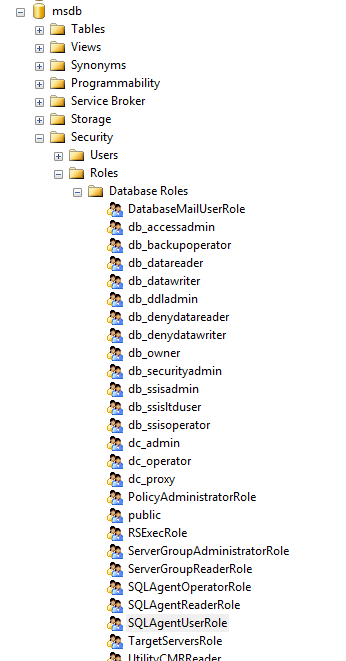
We took a look in MSDB, though, and came up with the SQLAgentOperatorRole role. This was added in SQL Server 2005, but I'd never had cause to use it in the meantime and subsequently forgotten about it.
For this purpose, though, it's almost ideal. We added the contractor's user account and a test account as members of the group, then logged in again with the test account to see what we could & couldn't do. As the test user, we could add new jobs, add job steps, modify both at will and schedule them as necessary. We weren't able to pick existing job schedules, interestingly, but were forced to create our own set (I can see the point of this, but it goes a bit far for most situations).

Better still, we couldn't modify other jobs (jobs with other owners) with one important caveat: we were able to disable and enable jobs and job schedules from other owners. It's not at all clear to me in which situations it would be desirable to block someone from, say, editing a job description while allowing them to disable the entire job, but that appears to be the situation.

We decided to use the role nonetheless, deciding that 95% was better than nothing. I dug a bit further afterwards, though, and discovered that the role SQLAgentUserRole fit our needs better. As a member of this role, you can still create, modify, run and schedule your own jobs, but neither modify or disable jobs from other owners.

Re-learning stuff like this, and getting to use it in production scenarios, is what keeps this line of work continually interesting.

Labels: , ,

Thursday, May 17, 2012

Slow Progress

I spent a frustrating morning with a client recently trying to use a Progress database as the source for an Integration Services package. The fix, as is so often the case, was simple, but I figured it was worthwhile documenting it here. I'm afraid that it's a more technical post than I usually put here, but if I can save someone else the same trouble we had then it'll be worthwhile.

The problem was as follows: we were trying to automate importing data from a Progress database to an MS SQL database using an SSIS package built on a 64-bit Windows 7 machine. We had an ODBC link set up (using the 32-bit OpenEdge drivers) that appeared to be working fine for the Import/Export Wizard and source previews and the likes - we could see and query data - but failed with ODBC error messages when run as an SSIS package from within the Business Intelligence Development Studio. "ERROR [IM002] [Microsoft][ODBC Driver Manager] Data source name not found and no default driver specified" 

Google searching the problem wasn't very encouraging. We tried a dozen different workarounds, from editing the connection strings to bypass the ODBC DSN, registry hacks, trying to fake a 64-bit ODBC connection, but nothing helped. Then, as sometimes happens, I remembered a setting in BIDS that I'd seen a long time ago, never used and then forgot about.

In BIDS, select "Properties" from the "Project" menu. Select "Debugging" on the left-hand side of the Property Pages dialog, then change the value of Run64BitRuntime under "Debug Options" to "False". That simple. Once I'd done that, the import package ran like a train.


Read more »

Labels: , , ,

Wednesday, February 23, 2011

Looping through SQL objects with SSIS

A lady named Barbara wrote this week to say that she'd enjoyed my SSIS Foreach Loop article, but she wondered how one might go about using the Foreach Loop container if the collection was made up of SQL tables instead of files. The procedure is quite similar; the difference lies in using the very useful Foreach ADO.NET Schema Rowset Enumerator to enumerate tables for a given schema.

I figured that the answer to her question, or one possible variant at least, was worth posting on the site, so here it is (PDF, 483KB).

Labels: , ,

Saturday, December 4, 2010

SQL Error Handling

Some time ago I wrote an introductory article for this site on SQL Error handling and the differences between SQL 2000 and SQL 2005 in that regard. (Download here as PDF). I had intended to expand upon this as a follow-up, but, as is so often the case, never got around to it.

Alex Kuznetsov has written a fantastic new book, "Defensive Database Programming with SQL Server", and one of the chapters from it deals with this subject in so much detail that I wouldn't dream of trying to top it. I'm not sure I'd completely agree with his contention that it may be better to implement your error trapping on the client in code, but his arguments are lucid and his examples compelling. Better yet, an article taken from the book on this subject can be found here. It's well worth your time.

Labels: , , , ,

Tuesday, August 11, 2009

SQL 2008 R2 News

The first Community Technology Preview - what we used to call an alpha back in the good old days - of SQL Server 2008 R2 is now available on MSDN. General availability will follow shortly, apparently.

Michael Otey over at SQL Server Magazine has an interesting point of view on the version - to whit, he feels that it's too soon to be releasing a new version considering most businesses haven't even made the move to the "regular" SQL 2008 build. I don't have an opinion yet, as I haven't yet got my own hands on an install. The features that I saw demoed back in March looked impressive, but I'm still learning new tricks and features of last year's release.

One of the disappointments in this first CTP is that the much-heralded MDS features aren't present, according to the indefatigable Jamie Thomson. This is one of the most interesting additions to SQL Server in some years, and it'll be really interesting to see what Microsoft have to offer when it finally arrives.

Labels: , , , ,

Monday, August 10, 2009

Scripting data

Scripting database objects, or entire databases, has always been easy in SQL Server, but scripting the data to populate the database tables used to be a different matter. A number of third-party tools were and are available that do the job nicely, but all the most useful ones have to be paid for.

However, I discovered an option for scripting data INSERTs straight from the SQL Server 2008 Management Studio. It's a little hidden away, but it's there and it works beautifully.

Select a database in SSMS, right-click, and choose "Tasks/Generate Scripts..." from the context menu.

Under the "Choose Script Options" wizard page set "Script Data" as True, set the other options as appropriate, select the necessary objects...et voilà:


Good or what? It works on SQL 2005 dbs too. It's obviously not the answer to every problem, but it's a nice extra to have.

Labels:

Thursday, August 6, 2009

Practical Database Mirroring Walkthrough

There's an interesting step-by-step walkthrough of a failover scenario using SQL Server Database Mirroring on the Gaffer-Tape Engineering blog. It's not quite a transparent behind-the-scenes intervention-free example, but that real world aspect to the story is what makes it interesting; you can find the article here.

Labels: , , ,

Wednesday, July 1, 2009

No naming names

…but a certain Very Large And Respected Accounting Firm was conducting an audit at a client recently, and I was asked to provide screenshots “proving” that access to certain financial information on their SQL Server databases was restricted, that only a certain number of people had permissions to create or alter SQL views used for reports.

I could understand the motivation behind the request, but the idea that this could be somehow proved by taking a couple of screenshots is pretty…um…alternative.

Firstly and most obviously, it’s easy to change role memberships and permissions assignments in the appropriate dialogs temporarily to show the auditors what they want to see, then change them back after the screenshots are made. Secondly, SQL Server provides you with a myriad of levels and means to enforce or apply permissions and restrictions.

I can say that all QueryDevelopers are members of db_owner, for instance, to give them all permissions on all objects within a given database. Or I can GRANT ALTER VIEW TO QueryDevelopers to allow them to change any view definition within the database. Or I can GRANT ALTER ON OBJECT::dbo.vwEndOfYearBalances TO QueryDevelopers to limit the permissions to a specified object.

There’s also nothing to stop me doling out permissions on an individual basis, instead of to groups or roles, so you can see that a couple of screenshots are not going to cover the case, particularly if you want to “prove” a negative – who isn’t allowed to change object definitions (or read data, or whatever)?

I hope and trust that our friends at the VLARAF check the bookkeeping records a little more thoroughly than they do SQL permissions. You’d think that they’d have a standardized query to spit out the effective permissions of each user or group in a database or on a database server, wouldn’t you? I sense a gap in the market…

Labels: , , ,

Tuesday, June 2, 2009

System views

I used to have a dead-tree version of the SQL 2005 system views poster a couple of years ago, and very handy it was. I needed it just now but had to download a PDF version, because the printed one has vanished. Anyway, maybe you'll find it handy too. Perhaps you're more interested in the SQL 2008 equivalent? Got that too. Let it never be said that I don't look after you.

Labels: ,

Thursday, May 28, 2009

To @@ERROR is human, too

I started writing a short blog post about a particularly egregious example of bad transaction handling I encountered the other day, and the thing just ran away with me. First it became a long post, then a couple of examples were added and before I knew where I was I'd gone 6 pages further and it had become a full-blown article to explain the very basics of how error trapping, error handling and transaction handling works in SQL Server (PDF, 252KB).

Labels: , , ,

Tuesday, May 12, 2009

SQL Server 2008 R2

Official notice of the next SQL Server release begins to drip through. The next version will be called SQL Server 2008 R(elease)2 and encompasses a host of interesting new features.

Labels: ,

Wednesday, May 6, 2009

Job dates made easy

Our good friends at Microsoft warn us all the time to stay away from the SQL system tables, but do we listen? No. Sometimes you just need information you can't get anywhere else, like (for instance) the date and time a SQL Agent job step runs (from msdb..sysjobhistory) or the time and date that a job is next scheduled (from msdb..sysjobschedules).

All well and good, but for their own undoubtedly sound reasons the architects at Microsoft decided once upon a time that these date and time values would be stored as integers in separate int columns, instead of in one datetime column. Even in SQL Server 2008, where separate date and time datatypes are available, the columns are defined as integers.

This makes comparisons and checks on these tables trickier than it otherwise should be. You can't just simply query on all job history from the past seven days, for example...unless you've got a function like this one:


create function [dbo].[fnGetJobDateAsDate]

(@p_JobDate int,
@p_JobTime int)

returns datetime

as
begin

-- Code © 2009 360Data

declare @v_DateStr nvarchar(48)
declare @v_Year int
declare @v_Month int
declare @v_Day int
declare @v_Hour int
declare @v_Min int
declare @v_Sec int
declare @v_JobDate datetime

select @v_Year = (@p_JobDate / 10000)
select @v_Month = (@p_JobDate - (@v_Year * 10000)) / 100
select @v_Day = (@p_JobDate - (@v_Year * 10000) - (@v_Month * 100))

select @v_Hour = (@p_Jobtime / 10000)
select @v_Min = (@p_Jobtime - (@v_Hour * 10000)) / 100
select @v_Sec = (@p_Jobtime - (@v_Hour * 10000) - (@v_Min * 100))

select @v_DateStr = convert(nvarchar(4), @v_Year) + N'-' +
convert(nvarchar(2), @v_Month) + N'-' +
convert(nvarchar(4), @v_Day) + N' ' +
replace(convert(nvarchar(2), @v_Hour) + N':' +
convert(nvarchar(2), @v_Min) + N':' +
convert(nvarchar(2), @v_Sec), ' ', '0')

select @v_JobDate = convert(datetime, @v_DateStr)

return @v_JobDate

end


The function requires date and a time parameter integer input in YYYYMMDD / HHMMSS format, just like in the msdb system tables, and returns a regular datetime value. Try it:

SELECT top 50 step_name, run_date, run_time, [YourDatabaseNameHere].[dbo].[fnGetJobDateAsDate] (run_date, run_time)
from msdb..sysjobhistory
order by run_date desc, run_time desc;


Result: happiness all around.

Labels: , ,

Thursday, April 30, 2009

Service Pack

A tiny bit behind-the-times with this news item because of holidays in between, but it's worth mentioning that the first service pack for SQL Server 2008 is now available.

There's a useful article on the MSDN blogs about how to go about creating a slipstreamed SP1 install, so that you can install a complete SP1 build in one go on a new server rather than having to install the RTM build and then running the service pack over it. I haven't tried this myself yet, but if it works this is going to be a huge convenience and a real time-saver.

Labels:

Tuesday, April 14, 2009

A New Frontier

Tiengemeten is a small island located in part of the Maas delta about 20km south of Rotterdam. It's a nature reserve these days, the last inhabitant having left the island about two years ago. It's a beautiful place, wild and open, big enough to spend a day exploring and small enough to get around on foot. It's well worth a visit if you're in the neighbourhood.

It also makes for a suitable case study in presenting some of the spatial features of SQL Server 2008. I'm planning a series of posts on this topic, so this won't be the last mention of Tiengemeten on this blog.

Geographic features can be represented in several different ways using the spatial data types in SQL 2008; as points (longitude & latitude coordinates), lines (a joined series of coordinates with a begin and end) or polygons (two-dimensional closed areas bound by a set of coordinates). Polygons, broadly speaking, can be any shape and size. You can define Asia as a polygon, for instance, but also go to the other extreme: a mapping vendor I spoke to last week has polygons defined for every group of trees in the Netherlands!

I've got a SQL 2008 database table with 27 rows, each with one column of datatype geography which in turn contains one polygon per record. There's one large polygon with over 1100 data points representing the Dutch mainland:


..and 26 more records containing the polygons for each of the Dutch islands of any size:


Putting them all together, a simple SELECT [GeoPolygon] FROM NLIslands; gives us a very recognizable set of shapes in the Management Studio:


Tiengemeten is the polygon that looks like this:


Let's examine the record more closely. The data for the polygon is stored as a very unwelcoming looking hexadecimal binary number, 0xE610000001040C000000000068... and so on for another 400 characters or so. We can produce a more friendly-looking representation of this data by using the ToString() method of the geography datatype, however.

SELECT [GeoPolygon].ToString() FROM NLIslands;

returns

POLYGON ((4.3239999990910292 51.725999999791384, 4.3379999995231628 51.7269999999553, 4.3540000002831221 51.731000000145286, 4.3560000006109476 51.731999999843538, 4.3560000006109476 51.734999999869615, 4.2760000005364418 51.754999999888241, 4.2689999993890524 51.75400000018999, 4.26799999922514 51.751000000163913, 4.2760000005364418 51.74599999981001, 4.296000000089407 51.736000000033528, 4.3220000006258488 51.728000000119209, 4.3239999990910292 51.725999999791384))

...which is instantly recognizable as a set of longitude and latitude co-ordinates. You'll notice that the first and last x-y pairs are identical; this is obligatory for a valid polygon definition.

You can produce the exact same representation yourself by reversing the process.

declare @v_Tiengemeten  geography = 'POLYGON ((4.3239999990910292 51.725999999791384, 4.3379999995231628 51.7269999999553, 4.3540000002831221 51.731000000145286, 4.3560000006109476 51.731999999843538, 4.3560000006109476 51.734999999869615, 4.2760000005364418 51.754999999888241, 4.2689999993890524 51.75400000018999, 4.26799999922514 51.751000000163913, 4.2760000005364418 51.74599999981001, 4.296000000089407 51.736000000033528, 4.3220000006258488 51.728000000119209, 4.3239999990910292 51.725999999791384))';

select @v_Tiengemeten;

Not very exciting so far for sure, but we're only getting started here. If you'll bear with me for a couple of months, I should be able to demonstrate some of the rich geospatial functionality of SQL Server 2008 and in particular how spatial data can be combined with "normal" relational datasets to produce surprising and incredibly useful queries and results.

If you'll permit a pun, watch this space.

Labels: , ,

Cheat sheets

Or, to be more accurate, handy lists of SQL shortcuts, syntax, functions and other useful reference topics covering a multitude of common situations. And they're all here...

Labels: , ,

Monday, April 6, 2009

A little light reading

Two brand new books arrived in the post last week, and I'm really looking forward to diving into both. The first is "Microsoft SQL Server 2008 Internals" by the mighty Kalen Delaney (a good Irish name, if ever I heard one). The book is billed as "the definitive guide to the internals and architecture of the Microsoft SQL Server 2008 relational database engine", so it's obviously essential holiday reading.

The second book is "Inside Microsoft SQL Server 2008: T-SQL Querying", Itzik Ben-Gan's follow-up to the peerless "Inside Microsoft SQL Server 2005: T-SQL Querying". This latter tome and its companion volume "Inside Microsoft SQL Server 2005: T-SQL Programming" are the two best SQL books I've ever read, by some distance. The elegance of Mr. Ben-Gan's queries and his entire approach are nothing short of inspirational.

In the prosaic world of datasets, records, queries and joins I'd go so far as to say that Mr. Ben-Gan is the closest thing we have to an artist, and I can only urge anyone with the least interest in writing better SQL code to read his books and learn from the master. We're not worthy!

Labels: ,

Friday, March 20, 2009

The price is right

You don’t get to be a world-dominating software juggernaut like Microsoft by just giving stuff away for free, so it’s little wonder that most of their most popular products are relatively expensive. Good value for money in most cases, but not cheap.

It’s fair to say, though, that there’s an astonishing amount of top-notch full-functioning software from Microsoft that’s available absolutely free. Microsoft themselves don’t always make a big song-and-dance about the fact, which is perfectly understandable – they’d rather you paid for full or professional versions of their products, but there are a number of tools and applications I’d like to draw your attention to. They’re all free, with no onerous licence restrictions and completely redistributable.

  • My absolute favourite is SQL Server Express. This is nothing less than a very-slightly-limited version of MS SQL Server Standard edition, as used by businesses the world over. It’s 100% compatible with all the paid editions and supports databases (in the SQL 2008 iteration) of up to 4GB in size. It comes with a management interface application and makes it possible to do almost everything (as a developer) that you can do in the Standard edition. If your database or the performance demands upon it grow to such an extent that the (paid) Standard edition does become necessary, then upgrading the database is as painless as restoring a backup. It’s a winner.

  • Second on the list is Visual Web Developer. This is a full-featured development environment for designing ASP.NET web sites and applications, and offers an identical experience to the (paid and relatively expensive) Visual Studio, as far as web development is concerned. It’s powerful and supports technologies like AJAX and full CSS. And it’s completely free.

  • The last hidden gem I’d like to mention is the Access 2007 Access Runtime. This is a real boon to those of us who still have to ship Access applications. You want to work in Access 2007 yourself, but your customers may not yet have upgraded from their old Access version, or they may not have Access installed at all. The Runtime engine is the answer; you install it license-free on your client’s workstation PCs and they can start your Access 2007 solution without any other Office or Access installation needing to be present. As a side benefit, because they can’t change the application or create new databases with it, your app is partially protected by default (though you’d be crazy to rely solely on the fact).

    Another nice extra is the fact that you get a professional packager for your solutions, so you can provide your client with a proper SETUP.EXE with your own text, logos, etc and make his or her setup experience trouble-free. See, I’m giving away all my secrets here.

A lot of people think Microsoft-based solutions are automatically expensive, but a little research and investigation will bring you a long way without spending any money at all, and tools and platforms like these are always my default choice when I’m beginning new projects.

A penny saved is a penny earned, right?

Labels: , , ,

Friday, March 13, 2009

The foothills of Kilimanjaro

Up to Noordwijkwerhout today for the Microsoft Application Platform Congress, during which Microsoft and its partners outlined their vision for the current and next generation of tools and technologies developers and solution providers will use to create and provide applications for customers.

Sometimes these events can be a little wearisome, if truth be told, but today's session was fascinating. We got a look at some of the features of the next version of SQL Server, code-named Kilimanjaro. It's tightly integrated with Excel in a way that Microsoft have been promising for years now but have never quite seemed to deliver. Today, though, we saw a 20-million row Excel table populated from SQL and sorted and auto-filtered in the blink of an eye. The new BI features include a sort of pivot table on steroids, with the ability to slice up and drill down in every conceivable way. Possibly the most impressive thing was that this was all taking place natively in Excel, just running in memory, but a button-click revealed the star schema thus created, ready for saving out to SQL Analysis Services.

They also talked about support for databases of 150 terabytes, if you can imagine such a thing, and how one goes about making such a database perform. It's hard to have patience with slow-performing apps and queries on 5 Gb datasets once you've seen 150 terabytes of data return a result set in a few seconds.

This is a little in the future, for now - release is scheduled for early next year - but my personal epiphany concerned a feature available right now in SQL Server 2008: spatial data. After the demo I saw today, I suddenly realise the potential of this feature and can't wait to put it to good use.

Labels: , , , , ,

Monday, February 23, 2009

SQL 2008 date and time values

I've been looking at SQL 2008 for well over a year in various guises, but between one thing and another it's only now that I'm actually doing any serious work with SQL 2008 databases. It's a chicken and egg situation, of course; you don't want to fool around with valuable customer database installations that are running perfectly well with SQL 2005 until you're completely confident with the new version, but you don't become completely comfortable with the new version until you've worked intensively with it for a while.

However, I was examining a problem involving frequent calculations on date values recently and SQL 2008 seemed like the obvious choice. Dates are painful in SQL 2005 and all earlier versions; a date and a time are always stored together even if you're only interested in the date or the time. You can ignore the other component, but you need to take care it doesn't come back and bite you when you're doing calculations: March 4 2009 is two days later than March 2 2009 but March 4 2009 01:12 is not two days later than March 2 2009 23:59, so the answer you get is very much dependent on how you frame the question.

There are ways around these problems, of course (I usually pass all date and time inputs through cleansing functions so they all save the same way), but it's all extra work for no good reason.

SQL 2008 though, among many other improvements, features separate date and time data types. This is a particular blessing, and works simply and beautifully. I'm also thrilled to at last have a debugger in the Management Studio, and working without it in SQL 2005 databases has rapidly become frustrating.

Labels: , ,